

Sling Resource Resolution: How Requests Map to Content
Apache Sling is at the heart of AEM’s web framework. One of its most powerful features is resource resolution, the process that maps HTTP requests to content in the repository and then to the scripts or servlets that generate the response.
Understanding Sling resource resolution is key to writing maintainable and scalable AEM applications. It explains why your URLs work the way they do, how scripts are selected, and how the framework dynamically adapts to changes in content.
1. What Is Resource Resolution?
Resource resolution is the process Sling uses to determine:
Which resource (JCR node) corresponds to an HTTP request
Which script or servlet will render or process that resource
Every URL in AEM eventually maps to a resource in the JCR, and understanding this mapping is critical for custom routing, servlets, and templates.
2. How Sling Resolves a Request
Given a request URL:
http://localhost:4502/content/mysite/en/home.html
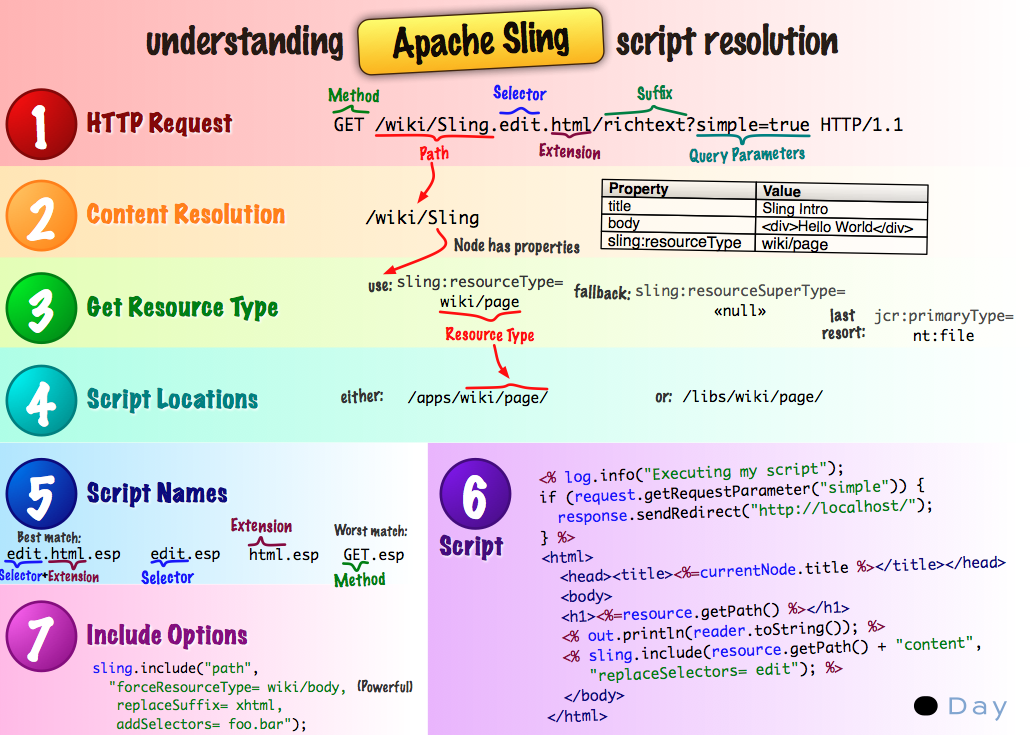
Sling resolves it step by step:
Resource Path
/content/mysite/en/homeis mapped to a JCR node (cq:Page+jcr:content)
Selectors and Extension
.html→ extension.print.html→ selectors (optional)
Resource Type
Each resource has a
sling:resourceTypepropertyMaps to a script or servlet to render the resource
Script Resolution
- Sling searches
/apps→/libsfor scripts matching:
/<resourceType>.<selector>.<extension>or/<resourceType>.<extension>
- Sling searches
3. URL Anatomy in Sling
/content/mysite/en/home.print.a4.html
|--------|--------|-------|----|
 Path    Selector  Suffix  Extension
Path → Maps to the JCR node
Selector → Optional instructions for the script (e.g.,
print)Suffix → Extra info (ignored by Sling for resolution)
Extension → Determines the script type (
html,json,xml)
Example:
home.print.a4.htmlcould render a print-ready version of a page using a specific script.
4. Resource Mapping Rules
Primary resource: The JCR node at the requested path
Fallback: Sling will traverse parent nodes if resource is not found
Aliases: Nodes can define
sling:aliasto map multiple URLs to a resourceVanity URLs:
/home.html→/content/mysite/en/homeviasling:vanityPath
5. Script Resolution Order
When Sling looks for a script to render a resource:
Check resourceType of node (
sling:resourceType)Look in
/apps/<resourceType>firstIf not found, fall back to
/libs/<resourceType>Match selectors and extension
If multiple scripts match, Sling uses the most specific
This order allows project-level overrides in
/appswithout modifying/libs(best practice in AEM projects).
6. Servlets and Resource Resolution
Sling maps not just scripts, but also servlets to resources
Servlets can be registered using:
sling.servlet.resourceTypes→ Bind to a resource typesling.servlet.selectors→ Optional selectorssling.servlet.extensions→ Optional extensions
Example: A servlet registered for
sling:resourceType = mysite/components/pageandselector = printwill handle/content/mysite/en/home.print.html.
7. Key Takeaways
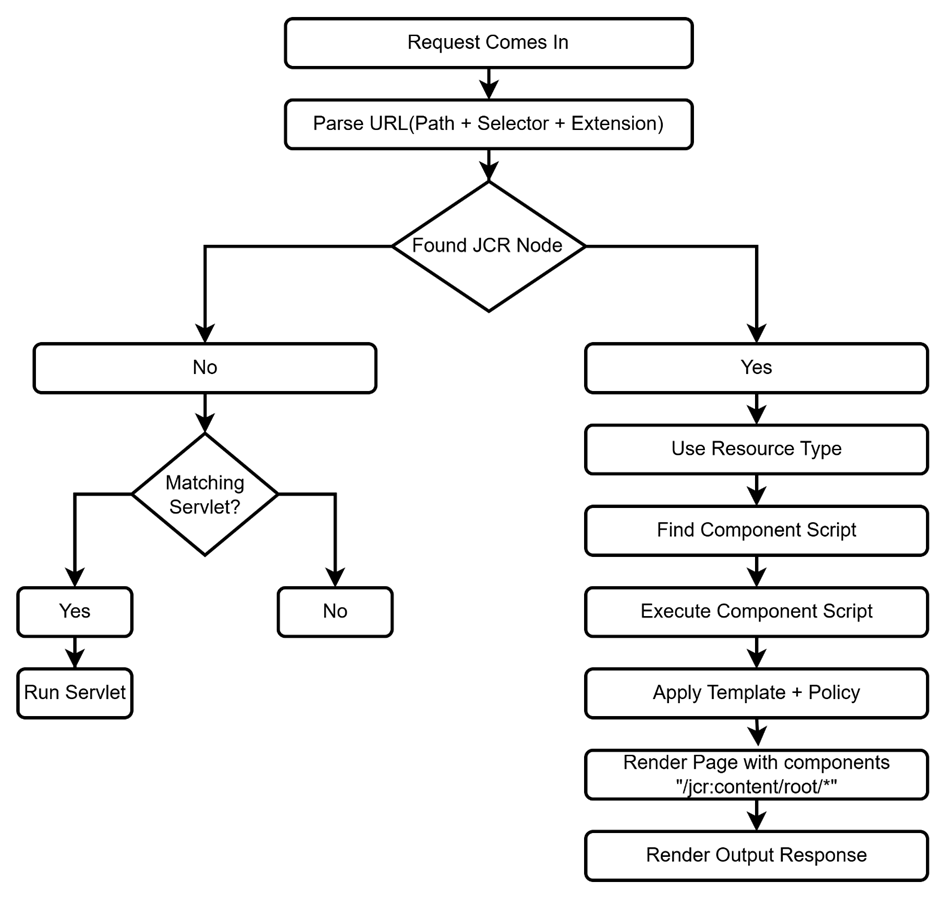
Every HTTP request in Sling maps to a resource in the repository
Resource resolution considers path, selectors, suffix, extension, resource type, scripts, and servlets
/appsoverrides/libsfor customizationUnderstanding resource resolution is crucial before building servlets, Sling Models, or REST endpoints
Vanity URLs and aliases make the site flexible and SEO-friendly
What’s Next?
In the following post, we’ll dive into Sling Servlets, explaining how servlets are registered, how selectors and extensions influence routing.
Comments
Join the discussionNo comments yet. Be the first to comment.